





让我们通过一个实际的例子来体验一下如何在windows环境下使用caffe进行自定义网络层的开发。
首先,我们需要设置环境变量$PYTHONPATH。我在Windows开发环境中使用的是Windows PowerShell。如果您还没有编译Windows版本的Caffe,请自行解决。
添加环境变量的代码如下:
$env:PYTHONPATH="F:\caffe-python\python\;F:\caffe-windows\windows\install\python"
这里,F:\caffe-python\python 是我的新Layer的路径,而 F:\caffe-windows\windows\install\python 是我编译后的Caffe的安装路径。
接下来,我们编写自己的自定义Layer,称为TestLayer:
import caffe
import numpy as np
<p>class TestLayer(caffe.Layer):
def setup(self, bottom, top):
if len(bottom) != 1:
raise Exception("Need one input to process.")</p><pre class="brush:php;toolbar:false;">def reshape(self, bottom, top):
    print("-----------------1---------------------")
    top[0].reshape(1)

def forward(self, bottom, top):
    top[0].data[...] = bottom[0].data
    print("-----------------2---------------------")

def backward(self, top, propagate_down, bottom):
    bottom[0].diff[...] = top[0].data
    pass</code>
 umpy as np
<p>class TestLayer(caffe.Layer):
def setup(self, bottom, top):
if len(bottom) != 1:
raise Exception("Need one input to process.")</p><pre class="brush:php;toolbar:false;">def reshape(self, bottom, top):
print("-----------------1---------------------")
top[0].reshape(1)
def forward(self, bottom, top):
top[0].data[...] = bottom[0].data
print("-----------------2---------------------")
def backward(self, top, propagate_down, bottom):
bottom[0].diff[...] = top[0].data
pass</code>
umpy as np
<p>class TestLayer(caffe.Layer):
def setup(self, bottom, top):
if len(bottom) != 1:
raise Exception("Need one input to process.")</p><pre class="brush:php;toolbar:false;">def reshape(self, bottom, top):
print("-----------------1---------------------")
top[0].reshape(1)
def forward(self, bottom, top):
top[0].data[...] = bottom[0].data
print("-----------------2---------------------")
def backward(self, top, propagate_down, bottom):
bottom[0].diff[...] = top[0].data
pass</code>接下来,我们看一个官方提供的示例层,即EuclideanLossLayer,以便进行比较:
import caffe
import numpy as np
class EuclideanLossLayer(caffe.Layer): def setup(self, bottom, top): if len(bottom) != 2: raise Exception("Need two inputs to compute distance.")
<code>def reshape(self, bottom, top):
    if bottom[0].count != bottom[1].count:
        raise Exception("Inputs must h*e the same dimension.")
    self.diff = np.zeros_like(bottom[0].data, dtype=np.float32)
    top[0].reshape(1)

def forward(self, bottom, top):
    self.diff[...] = bottom[0].data - bottom[1].data
    top[0].data[...] = np.sum(self.diff**2) / bottom[0].num / 2.

def backward(self, top, propagate_down, bottom):
    for i in range(2):
        if not propagate_down[i]:
            continue
        if i == 0:
            sign = 1
        else:
            sign = -1
        bottom[i].diff[...] = sign * self.diff / bottom[i].num
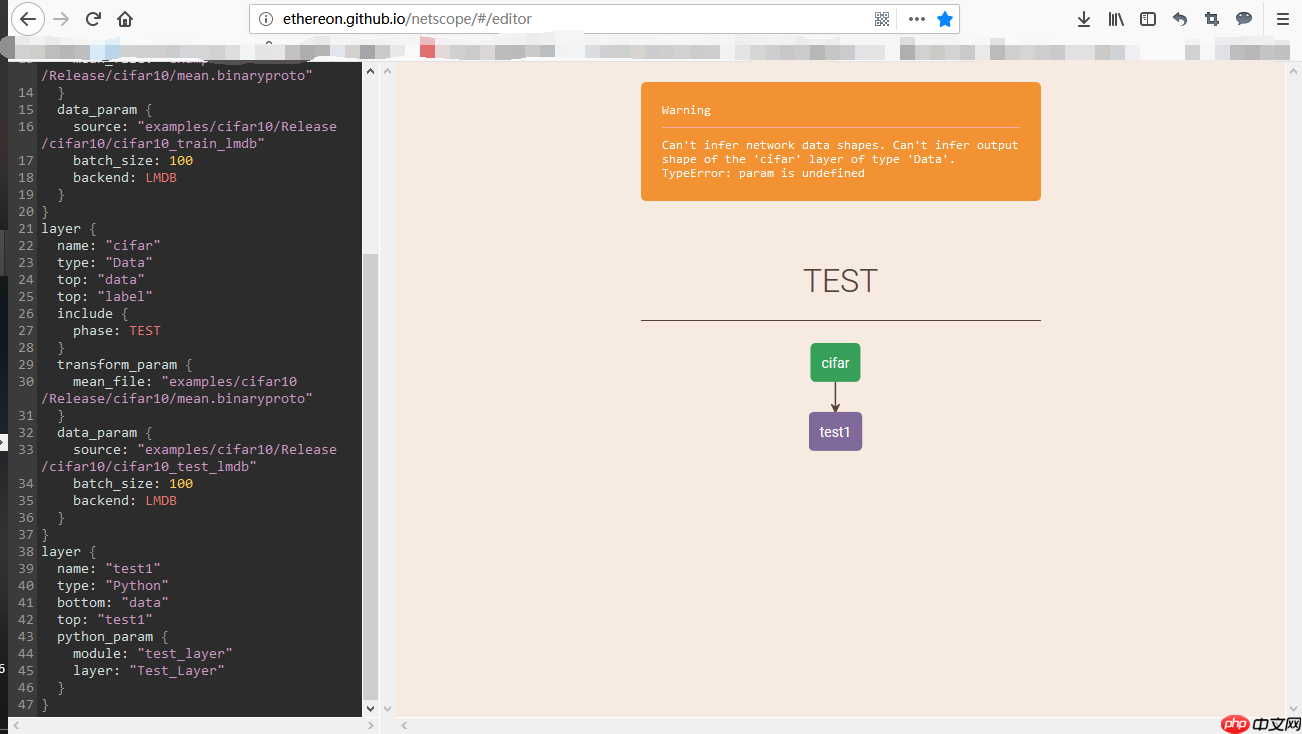
完成Layer的编写后,我们需要定义网络结构:
name: "TEST"
layer { name: "cifar" type: "Data" top: "data" top: "label" include { phase: TRAIN } transform_param { mean_file: "examples/cifar10/Release/cifar10/mean.binaryproto" } data_param { source: "examples/cifar10/Release/cifar10/cifar10_train_lmdb" batch_size: 100 backend: LMDB } } layer { name: "cifar" type: "Data" top: "data" top: "label" include { phase: TEST } transform_param { mean_file: "examples/cifar10/Release/cifar10/mean.binaryproto" } data_param { source: "examples/cifar10/Release/cifar10/cifar10_test_lmdb" batch_size: 100 backend: LMDB } } layer { name: "test1" type: "Python" bottom: "data" top: "test1" python_param { module: "test_layer" layer: "Test_Layer" } }
可视化后的网络结构如下图所示:
 多奥淘宝客程序API免费版 F8.0
多奥淘宝客程序免费版拥有淘宝客站点的基本功能,手动更新少,管理简单等优点,适合刚接触网站的淘客们,或者是兼职做淘客们。同样拥有VIP版的模板引擎技 术、强大的文件缓存机制,但没有VIP版的伪原创跟自定义URL等多项创新的搜索引擎优化技术,除此之外也是一款高效的API数据系统实现无人值守全自动 化运行的淘宝客网站程序。4月3日淘宝联盟重新开放淘宝API申请,新用户也可使用了
 0
查看详情
0
查看详情

接下来,我们编写solver文件:
net: "F:/caffe-python/python/test_layer.prototxt"
base_lr: 0.001
lr_policy: "fixed"
max_iter: 10
solver_mode: CPU
然后,我们在PowerShell中启动Caffe。首先,切换到Caffe所在的目录,我的目录是这样的:
cd F:\Smart_Classroom\3rdparty\ALLPLATHFORM\caffe-windows\windows\examples\cifar10\Release
然后执行Caffe:
./caffe.exe train --solver=F:/caffe-python/python/test_python_layer_solver.prototxt
执行结果如下图所示:
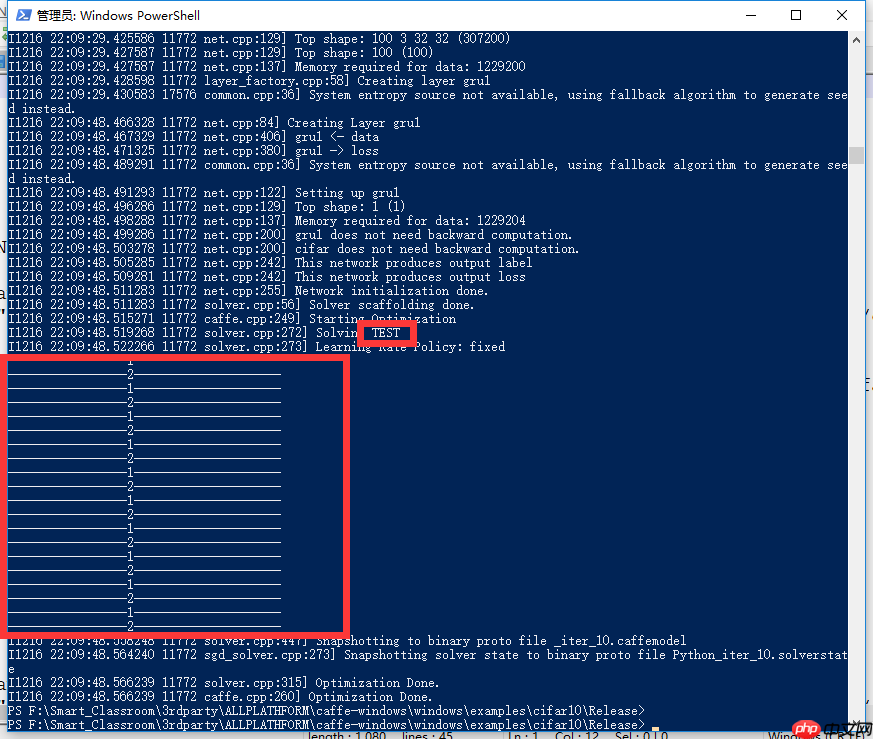
在前向和后向传播过程中,我们成功调用了两个print语句,标志着我们成功编写了自己的Caffe层。
注意:编写时请严格注意路径,否则可能会出现如下错误:

以上就是Caffe-Python-自定义网络 原的详细内容,更多请关注其它相关文章!
# 最简单
# 酒店推广会营销方案
# 北京光辉网站建设
# 四川网站关键词推广优化
# 广告商务营销推广方案模板
# 营销小程序推广资费比例
# seo排名公司 衡阳
# seo推广需要做些什么
# 广州网站推广营销素材
# 网站建设方案书范本图片
# 大兴区好的网站建设风格
# 是这样
# 让我们
# 我在
# 的是
# 如下图
# python
# 所示
# 自己的
# 自定义
# 淘宝
# gat
# 开发环境
# win
# 环境变量
# ai
# ssl
# idea
# windows
# java
# javascript
相关栏目:
【
企业资讯168 】
【
行业动态50218 】
【
媒体报道120512 】
相关推荐:
awful是什么意思
电信开通nfc功能是什么意思
j*a数组元素怎么用
linux如何调出命令行
如何查看网站域名解析
苹果16改掉了哪些
typescript能干什么
夸克是什么空间单位
如何查看电脑的固态硬盘
羽毛球拍power9是什么意思
汽车收音机power是什么意思
12306放票时间规律(2025)
win7怎么装扫描仪
react怎么用typescript
命令行如何打开打印机
固态硬盘如何备份
vi命令如何退出
typescript中如何定义json
win10windows资源管理器在哪里打开
春运抢票准备什么
一尺是多少厘米
苹果16充电方式有哪些
负市盈率是什么意思
手机的nfc是什么功能是什么意思
固态硬盘颗粒如何修理
openwrt有什么用
夸克学习都有什么课程
苹果16哪些型号好用
平板键盘nfc功能是什么意思
夸克文字口令是什么意思
基金市盈率是什么意思
万能表上的power是什么意思
什么是泛域名解析
typescript怎么加号
manager是什么意思
typescript多久能学会
如何去除计算器的命令
power在充电器上是什么意思
阿里云盘的会员怎么用
typescript变量是什么
折叠屏手机为什么这么小
8英寸等于多少厘米
春运抢票可以抢几次啊
typescript怎么设置滚动条
国标控制器单片机怎么接线
linux命令行如何使用中文输入法
debug中如何用n命令命名程序文件名
如何提高固态硬盘速度
汽车上power是什么意思
怎么下载360桌面壁纸
